

Blog
GPU Buying Guide 2026 ; The Cards You Should Stop Considering, and What to Get Instead

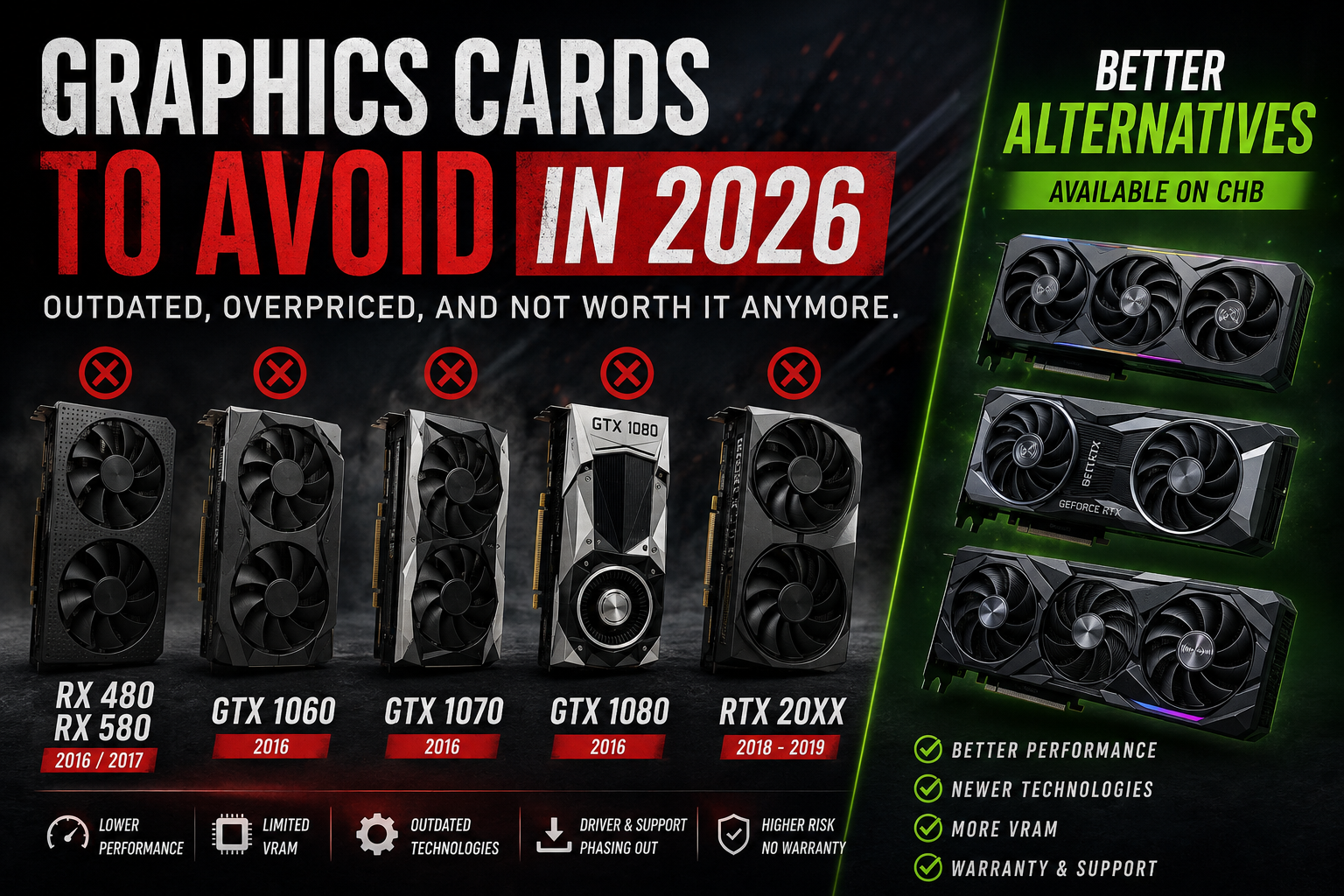
There is a question we hear quite often at CHB Store: “Is my old graphics card still good enough?”
Sometimes, the answer is yes. A GTX 1070 can still run plenty of games. An RX 580 can still handle esports titles. Even some RTX 20 series cards remain perfectly usable today.
The more important question, however, is whether you should still buy one in 2026.
That is a different question, and it is where things get interesting. A graphics card can still work perfectly and yet be a poor investment when you consider its age, VRAM, features, power consumption, driver support, condition and, above all, its price compared with newer hardware.
So this is not a list of hardware that suddenly became useless. Quite the opposite. Some of these cards were among the best recommendations of their generation. We sold them, used them and recommended them ourselves.
But the PC gaming landscape has moved on. If you are building or upgrading a gaming PC today, there are several older GPUs we would think twice about before spending money on.
RX 480 and RX 580: Polaris Had a Good Run
When the Radeon RX 480 arrived in 2016, it was a very important card for AMD. It brought solid 1080p performance to a much more accessible price range and gave PC builders a genuine alternative to NVIDIA’s mainstream offerings.
The RX 580 followed in 2017 with higher clocks and became one of the most common gaming GPUs of its generation. Millions of these cards ended up in gaming PCs, and many of them are still running today.
That longevity deserves some credit.
The problem is that the hardware has not changed, while the games around it have.
The RX 480 and RX 580 are based on the Polaris architecture and use GDDR5 memory. Depending on the model, you will find 4GB or 8GB of VRAM. Eight gigabytes sounds comfortable until you look at what modern games actually demand.
In newer titles, VRAM usage can become a serious limitation even at 1080p. Once a card reaches its memory limit, average FPS does not tell the whole story. Texture loading, frame-time spikes and stuttering can make a game feel much worse than the benchmark number suggests.
The RX 580 can still be perfectly reasonable for older games, esports and lighter workloads. That is why we would not call it “useless”. We would simply question the idea of buying one as the foundation of a new gaming PC in 2026.
RX 480 / RX 580: 1080p Performance
| Game | Settings | Avg FPS | 1% Low | Experience |
|---|---|---|---|---|
| Cyberpunk 2077 | 1080p Medium, RT Off | 22 fps | 14 fps | Not recommended |
| Alan Wake 2 | 1080p Medium, RT Off | 18 fps | 11 fps | Not recommended |
| Hogwarts Legacy | 1080p Medium | 31 fps | 19 fps | Heavy compromises |
| Fortnite | 1080p High, DX12 | 44 fps | 28 fps | Playable with compromises |
| CS2 | 1080p High | 61 fps | 42 fps | Acceptable |
| GTA V | 1080p Very High | 78 fps | 54 fps | Good |
The pattern is easy to see. Older and less demanding games are still comfortable. Modern AAA titles are a different story.
These figures should also be treated as reference results rather than a universal promise. Your CPU, driver version, RAM configuration and exact graphics card model can all change the final result.
The Used RX 580 Problem
There is another reason we are cautious with older RX 580 cards: condition.
The RX 580 was widely used during the cryptocurrency mining boom. That does not mean every second-hand RX 580 has been mined on, but it does mean buyers should be aware of the possibility.
A graphics card that has spent years under sustained load can show wear in places that are difficult to identify just by looking at it. Fans, thermal paste, thermal pads, VRMs and memory can all tell a different story from the condition of the exterior.
And that is the biggest weakness of buying an old GPU from an unknown seller: you are buying the hardware, but you are also buying its history, whether you know that history or not.
GTX 1060, 1070 and 1080: Pascal Was Excellent. It Is Just Very Old Now.
Let’s give Pascal the credit it deserves.
The GTX 1060, GTX 1070 and GTX 1080 were excellent graphics cards. The GTX 1060 became one of the most common GPUs among PC gamers because it offered a very good balance of price and performance. The GTX 1070 was a fantastic 1440p option, while the GTX 1080 pushed even further into high-end territory.
They were efficient, reliable and surprisingly long-lived.
But Pascal launched in 2016. We are now in 2026.
Ten years is a long time in PC hardware.
The biggest disadvantage is not simply raw performance. Pascal predates NVIDIA’s RTX architecture, meaning these cards do not have dedicated hardware for modern ray tracing or Tensor Core acceleration. They also lack DLSS and the newer frame-generation technologies available on current NVIDIA GPUs.
That matters because modern games increasingly use technologies that can compensate for the limitations of a GPU. An older card has fewer tools available when native rendering becomes too demanding.
GTX 1060: Still Fine for the Right Games
| Game | Settings | Avg FPS | 1% Low | Experience |
|---|---|---|---|---|
| Cyberpunk 2077 | 1080p Medium, RT Off | 28 fps | 18 fps | Heavy compromises |
| Hogwarts Legacy | 1080p Medium | 31 fps | 20 fps | Heavy compromises |
| The Last of Us Part I | 1080p Low | 34 fps | 21 fps | Limited |
| Fortnite | 1080p High, DX12 | 52 fps | 33 fps | Playable |
| CS2 | 1080p High | 74 fps | 48 fps | Good |
| Valorant | 1080p High | 120 fps | 88 fps | Very good |
This is why we would not tell an existing GTX 1060 owner to throw the card away. If you mainly play Valorant, CS2, older games or lighter titles, it can still do its job.
Buying one today for a new gaming PC is another matter, especially the 3GB model. At this age, VRAM capacity and platform support become much harder to ignore.
GTX 1070 and GTX 1080: From 1440p Favourites to Budget Options
| Game | Settings | GTX 1070 | GTX 1080 | Experience |
|---|---|---|---|---|
| Alan Wake 2 | 1080p Medium, RT Off | 29 fps | 38 fps | Not ideal |
| Cyberpunk 2077 | 1080p Medium, RT Off | 35 fps | 46 fps | Limited |
| The Last of Us Part I | 1080p High | 38 fps | 49 fps | Playable with compromises |
| Hogwarts Legacy | 1080p High | 41 fps | 53 fps | Playable with compromises |
| CS2 | 1080p High | 88 fps | 104 fps | Good |
The GTX 1070 was promoted as a strong 1440p card when it launched. Today, it makes more sense as a budget 1080p card, and even then only if the price reflects its age.
A graphics card does not become a bad product simply because it is old. It becomes a bad purchase when its price no longer reflects what you are getting.
RTX 20 Series: Still Capable, But Increasingly Difficult to Justify
This generation deserves a little more nuance.
We would not put an RTX 2060, RTX 2070 or RTX 2080 in exactly the same category as a GTX 1060 or RX 580. Turing introduced hardware ray tracing and Tensor Cores to consumer GeForce cards. That makes the RTX 20 series considerably more modern than Pascal.
The problem is that Turing is now several generations old, and the advantages it introduced have since been expanded considerably.
The RTX 20 series can use DLSS, but it does not support the newer frame-generation features introduced with later generations. Ray tracing performance is also much weaker than what you get from current hardware.
RTX 2060 and 2060 Super: The VRAM Question
The standard RTX 2060 comes with 6GB of GDDR6. That was perfectly reasonable when the card launched. In 2026, however, 6GB can become a constraint in demanding games, particularly when higher texture quality and modern rendering features are involved.
| Game | Settings | RTX 2060 | RTX 2060 Super | VRAM Situation |
|---|---|---|---|---|
| Cyberpunk 2077 | 1080p High, RT Off, DLSS Quality | 54 fps | 63 fps | Near the limit |
| Cyberpunk 2077 | 1080p Medium, RT Medium, DLSS | 29 fps | 36 fps | Heavy pressure |
| Alan Wake 2 | 1080p Medium, RT Off | 38 fps | 46 fps | Limited |
| Hogwarts Legacy | 1080p High | 47 fps | 55 fps | Near the limit |
| Fortnite | 1080p High, DX12 Nanite | 61 fps | 72 fps | Fine |
| Valorant | 1440p Max | 160 fps | 185 fps | Fine |
The RTX 2060 can still be a perfectly decent 1080p card. If you already own one, there is no reason to panic. If you are buying one second-hand, however, the price needs to be low enough to compensate for its age and 6GB memory configuration.
RTX 2070, RTX 2080 and RTX 2080 Ti: Watch the Second-Hand Price
The RTX 2070 and RTX 2080 are still capable cards. The RTX 2080 Ti can also deliver respectable performance in many games.
That is precisely why these cards can be tempting on the second-hand market.
The problem is not that they suddenly stopped working. The problem is what else you can buy for the same money.
A used RTX 2080 Super or RTX 2080 Ti needs to be compared against current-generation cards offering newer architectures, longer support, newer upscaling features, better ray tracing performance and, importantly, a proper warranty.
| Feature | RTX 2060 / Super | RTX 2070 / Super | RTX 2080 / Ti |
|---|---|---|---|
| Modern Frame Generation | Not supported | Not supported | Not supported |
| DLSS | DLSS supported | DLSS supported | DLSS supported |
| Ray Tracing | 1st generation | 1st generation | 1st generation |
| VRAM | 6GB / 8GB | 8GB | 8GB / 11GB |
| Efficiency | Older architecture | Older architecture | High power for its age |
In other words, an RTX 2080 Ti is not automatically a bad card. It is simply much harder to recommend when its second-hand price gets close to a newer GPU with a warranty.
Used vs Refurbished: The Difference Matters
There is nothing wrong with buying used hardware. In fact, the second-hand market can be a great way to build an affordable PC.
The important thing is knowing exactly what you are buying.
A used graphics card is simply a card that has had a previous owner. It may be in excellent condition, or it may have spent years running at high temperatures. From the outside, it is often impossible to know.
A properly refurbished card is different. The important part is the testing process behind it.
A serious refurbishment process should include checks for GPU stability, VRAM errors, temperatures, fan operation, connectors and visual artifacts.
Refurbishment can reduce the risk associated with buying used hardware. It does not make an old GPU a new-generation GPU.
An RX 580 remains an RX 580. A GTX 1080 remains a GTX 1080. The benefit of refurbishment is confidence in the condition of the hardware, not additional performance.
What We Would Check Before Selling a Used GPU
For an older graphics card, a quick boot test is not enough. A card can display an image on the desktop and still fail when it reaches sustained gaming load.
A proper check should include:
- GPU stability under sustained load
- VRAM stability
- GPU and hotspot temperatures
- Fan operation and abnormal noise
- Visual artifacts
- Clock stability and thermal throttling
- Display outputs
- General physical condition
This is where buying from a retailer with a real SAV process can make a significant difference compared with buying from an unknown seller online.
Why Warranty and After-Sales Support Matter More With Older Hardware
When you buy a graphics card that is several generations old, you are accepting a higher level of hardware risk.
Fans wear out. Thermal interfaces age. Memory can develop faults. Components can become unstable under sustained load.
None of these problems necessarily appear during a five-minute test.
This is why price should never be the only number you compare.
A slightly more expensive new graphics card with a proper manufacturer warranty can make more sense than an older flagship bought from a private seller with no return option.
At CHB Store, we believe the purchase should not end when the box leaves the shop. Having a clear warranty and a point of contact when something goes wrong is part of the value of buying from a retailer.
What We Actually Recommend in 2026
If you are building a new gaming PC today, we would generally rather see the budget go toward a newer architecture than toward an old high-end card simply because it once carried a premium price.
Here are some of the current-generation options available through CHB Store.
RX 9060 XT: A Strong Choice for 1080p and 1440p
The RX 9060 XT is based on AMD’s RDNA 4 architecture and offers a 16GB GDDR6 configuration that makes it considerably easier to recommend as a long-term purchase than many older 6GB or 8GB cards.
For someone building a new gaming PC, that extra memory headroom matters. It gives you more flexibility with modern textures and future games, while the newer architecture brings support for current AMD technologies and ray tracing improvements.
| Specification | Detail |
|---|---|
| Architecture | RDNA 4 |
| VRAM | 16GB GDDR6 |
| Memory Bus | 128-bit |
| Upscaling | FSR 4 |
| Ray Tracing | Hardware accelerated |
| Target | 1080p Max / 1440p High |
→ View the RX 9060 XT on CHB Store
RX 9070 XT: A Serious 1440p Upgrade
If 1440p is your target, the RX 9070 XT is a much more ambitious option. It keeps the RDNA 4 architecture but moves to a larger GPU configuration, a 256-bit memory bus and 16GB of GDDR6.
It is also the kind of card that makes an older flagship look very different once you compare the complete package rather than just raw FPS.
You get a current architecture, current features, a much longer useful life ahead of it and the reassurance of buying new with warranty support.
| Specification | Detail |
|---|---|
| Architecture | RDNA 4 |
| VRAM | 16GB GDDR6 |
| Memory Bus | 256-bit |
| Memory Bandwidth | 640 GB/s |
| Upscaling | FSR 4 |
| Ray Tracing | Hardware accelerated |
| Target | 1440p Max / 4K with upscaling |
→ View the RX 9070 XT on CHB Store
RTX 50 Series: For Buyers Looking Further Ahead
NVIDIA’s current Blackwell generation brings the latest version of DLSS, newer ray tracing hardware and GDDR7 memory on the relevant models.
The biggest difference compared with the RTX 20 series is not simply the number of FPS. It is the amount of technology available to the GPU.
Features such as Frame Generation and Multi Frame Generation can make a significant difference in supported games, particularly at higher resolutions. They are not a replacement for raw GPU performance, but they are part of the modern gaming experience and something an older Turing or Pascal card simply cannot reproduce.
| Card | VRAM | Bandwidth | DLSS | RT Cores | Target |
|---|---|---|---|---|---|
| RTX 5060 Ti | 16GB GDDR7 | 448 GB/s | DLSS 4 + Multi Frame Generation | 4th gen | 1080p to 1440p |
| RTX 5070 | 12GB GDDR7 | 672 GB/s | DLSS 4 + Multi Frame Generation | 4th gen | 1440p to 4K |
| RTX 5080 | 16GB GDDR7 | 960 GB/s | DLSS 4 + Multi Frame Generation | 4th gen | 4K |
→ View the RTX 50 Series on CHB Store
So, Should You Replace Your Old Graphics Card?
Not necessarily.
If you already own an RX 580, GTX 1070 or RTX 2060 and it does everything you need, there is no reason to upgrade simply because a newer generation exists.
The situation changes when you are buying a graphics card today.
At that point, you are not comparing a new card with the card that existed ten years ago. You are comparing everything that comes with the purchase: performance, VRAM, efficiency, features, driver support, reliability, warranty and how long you expect to keep it.
That is why an old GPU can still be useful without necessarily being a smart purchase.
The CHB Rule: Look Beyond the FPS Number
When comparing graphics cards, we recommend looking at seven things:
- How old is the architecture?
- How much VRAM does the card have?
- What modern technologies does it support?
- How well does it perform in the games you actually play?
- How much power does it consume?
- What condition is the card in?
- What warranty and after-sales support come with the purchase?
If an older card wins purely because it is cheaper, make sure the price difference is actually large enough to justify the compromise.
Sometimes saving a little money today means giving up years of useful life, newer features and warranty coverage.
Final Verdict
None of the GPUs covered in this article suddenly became useless.
The RX 480 and RX 580 can still handle older and lighter games. GTX 1060, 1070 and 1080 cards can still deliver respectable 1080p performance in the right titles. RTX 20 series cards remain capable of running modern games and still offer features that Pascal never had.
But that is not the same as saying they are the best cards to buy in 2026.
The further we move into the current generation of games, the more important VRAM, modern upscaling, ray tracing performance, driver support and overall efficiency become.
And once you add the uncertainty of an old second-hand card, the equation changes again.
Our advice is simple: if you already own one of these cards and it works for you, keep using it. If you are buying one today, look very carefully at the price before calling it a bargain.
Sometimes the cheapest GPU is not the cheapest way to build a gaming PC.
For a new build, we would much rather see you spend your money on a current-generation card with modern features, a realistic amount of VRAM and proper warranty support.